Generate CSV of Google Music Playlist
I recently switched my music vendor from Google Music to Spotify. To avoid manually searching for each song, I semi-automized the transition as follows.
1. Generate a CSV (artist, title) from your Google Music Playlist. Zoom your window out all the way (querySelectorAll will only load a static list of currently active rows).
// Run in Chrome's Developer Tools Console: Crtl+Shift+I
var playlist = document.querySelectorAll('.song-table tr.song-row');
for(var i =0; i<playlist.length ; i++) {
  var l = playlist[i];
  var title = l.querySelectorAll('td[data-col="title"] .content')[0].textContent;
  var artist = l.querySelectorAll('td[data-col="artist"] .content')[0].textContent;
  console.log(artist.replace(","," ") + ',' + title.replace(","," ")); //take out "," to clean up CSV
}
Scroll and rerun until you have all entries.
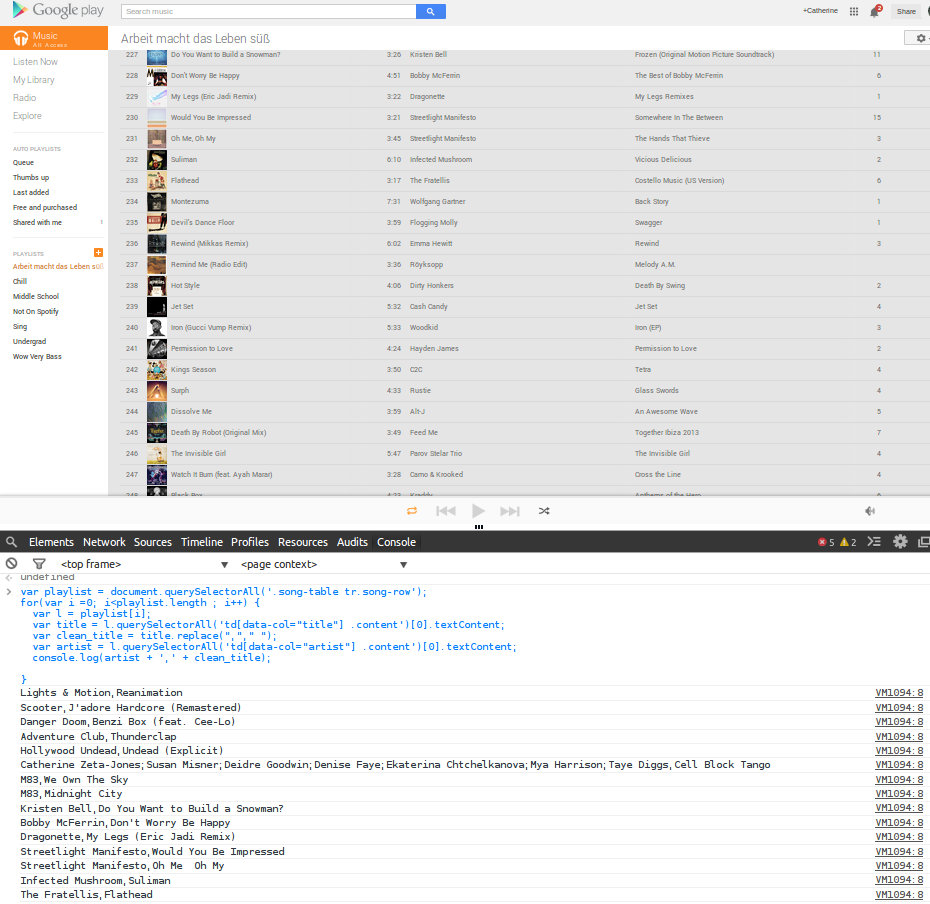
2. Open your CSV in vim to remove the VM290:8 at the end of each entry. For example: Clamavi De Profundis,Far Over the Misty Mountains Cold VM290:8
:%s/.{8}//
Now you have a CSV file of arists, titles to do with what you wish. To proceed with migrating this playlist to Spotify specifically, continue to steps 3 & 4.
3. Copy/paste into Ivy.
4. Paste Ivy results into desired playlist.
Comments from the old blog (3)
Recovered from the Wayback Machine of the old site after my back-up servers got black-hatted.
-
Hello, man!
Just a little suggestion: the script could output the results in a new window, avoiding the need to parse the text before save it as a CSV file.
The following lines, based in your great work, do it that way:
var csvData = '';

var playlist = document.querySelectorAll('.song-table tr.song-row');

for (var i = 0; i < playlist.length; i++) {

  var title = playlist[i].querySelectorAll('td[data-col="title"] .content')[0].textContent;

  var artist = playlist[i].querySelectorAll('td[data-col="artist"] .content')[0].textContent;

  csvData += '' + artist.replace(',', ' ') + ',' + title.replace(',', ' ') + '';

}

window.open('data:text/html;charset=utf-8,' + '' + csvData + '');
-
After posting this improvement, I found a new possibility to avoid scrolling to get all the songs in the list. Here is the final proposal:
var csvData = '';

var playlist = document.querySelectorAll('.song-table tr.song-row');

var container = document.getElementById('content-container');

container.scroller.style.height = '8000000px';

for (var i = 0; i < playlist.length; i++) {

	var title = playlist[i].querySelectorAll('td[data-col="title"] .content')[0].textContent;

	var artist = playlist[i].querySelectorAll('td[data-col="artist"] .content')[0].textContent;
csvData += '' + artist.replace(',', ' ') + ',' + title.replace(',', ' ') + '';
}window.open('data:text/html;charset=utf-8,' + '' + csvData + '');
-
Hello, man!
Just two little suggestions: the script could output the results in a new window, avoiding the need to parse the text before save it as a CSV file, and it can expand the list to get all the elements in just one run.
The following lines, based in your great work, do it that way:
var csvData = '';

var playlist = document.querySelectorAll('.song-table tr.song-row');

var container = document.getElementById('content-container');

container.scroller.style.height = '8000000px';

for (var i = 0; i < playlist.length; i++) {

	var title = playlist[i].querySelectorAll('td[data-col="title"] .content')[0].textContent;

	var artist = playlist[i].querySelectorAll('td[data-col="artist"] .content')[0].textContent;

	csvData += '<li>' + artist.replace(',', ' ') + ',' + title.replace(',', ' ') + '</li>';

}

window.open('data:text/html;charset=utf-8,' + '<ol>' + csvData + '</ol>');
Thanks for sharing this with the world!
Comments
Sign in with GitHub to leave one.