Matlab: Coaxial Cylinders (Polar Coordinates)
Let’s say we want to create an aesthetically pleasing visualization of 2 coaxial cylinders.
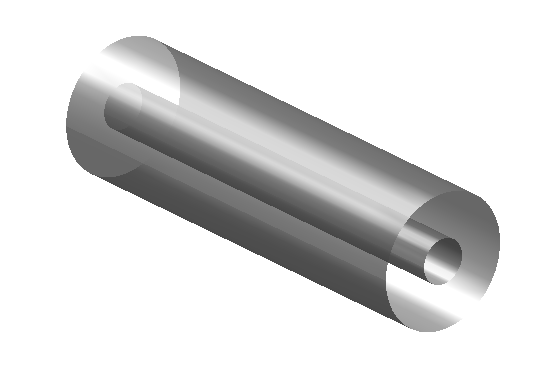
To do this, we’ll be adjusting the lighting, proportions, and transparency of the figure.
The code to create this figure utilizes the coordinate transformation from Cartesian to 3D-Polar coordinates. Recall that the transformation between coordinate systems is as follows.
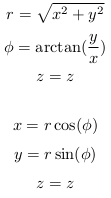
Instead of using Matlab’s built in cart2pol method, we will manually convert each Cartesian (x, y, z) coordinate to it’s equivalent polar coordinate (r, phi, z) .
Side note: I used phi above in the transformation equations and theta below in the code to make a point. The angular coordinate in the cylindrical (a.k.a polar) coordinate system is generally represented as either phi or theta. These are equivalent, and the variable chosen is purely a matter of notation.
Y=-5:5;
theta=linspace(0,2*pi,40);
[Y,theta]=meshgrid(Y,theta);
r = 1.5
% calculate x and z
X=r*cos(theta);
Z=r*sin(theta);
hs = surf(X,Y,Z)
set(hs,'EdgeColor','None', ...
        'FaceColor', [0.5 0.5 0.5], 'FaceLighting', 'phong');
alpha(0.7);
hold on
camlight right;
r = 0.5
% recalculate x and z
X=r*cos(theta);
Z=r*sin(theta);
hs = surf(X,Y,Z)
axis equal
set(hs,'EdgeColor','None', ...
        'FaceColor', [0.5 0.5 0.5], 'FaceLighting', 'phong');
alpha(0.7);
axis off
camlight right;
lighting gouraud
view(140, 24)
% white background
set(gcf,'color','white')
Comments from the old blog (1)
Recovered from the Wayback Machine of the old site after my back-up servers got black-hatted.
-
Hi,
How to put thickness for this coaxial cylinders?
Thx
Comments
Sign in with GitHub to leave one.